
CAPTURE
What do you not want to deal with?
✦ YOUR PERSONAL CONTROL CENTER
Welcome back.
All your goals, watches and opportunities. One place, arranged your way.
Loading your personalized dashboard…
MAKE IOOK YOURS
Customize dashboard
Widgets
Add or remove panels. Drag widgets on your dashboard to reorder them, or use their arrow controls.
Background
Choose a built-in background or upload your own. This image remains fixed while widgets scroll.
Dream car tracker
Optional. Enter your real target and saved amount to unlock a progress chart. No financial information is inferred.
Dream job preparation milestones
YOUR CAREER · UNDERSTOOD
Know your fit.
Make your next move stronger.
Upload your résumé, tell IOOK the role you want, and get evidence-based job-fit insights, a practical skill plan, interview prep and a tailored résumé you can review and edit.
Real strengths, not flatteryNo invented credentialsWorks with Job Watch
01Your backgroundUpload PDF, Word or TXT
02Your target jobDescribe the role or paste the vacancy
03Your advantageGet a plan and tailored application
Sign in to use Career Intelligence
Log in or create an account →
Analysis is attached to your authenticated IOOK session. Your résumé is not saved to your account.
YOUR INPUT
Build your candidate profile.
You control the information sent for analysis. Nothing is submitted until you approve it.
Your résumé is only saved when you select “Save to my IOOK account”. Approved analysis is sent to the configured AI provider. You can delete your saved Career Intelligence record at any time.
YOUR INTELLIGENCE REPORT
An evidence-based picture.
Use this to guide decisions, not as a guarantee of hiring.
—
Evidence in your favour
Missing or unverified requirements
Close the most relevant gaps.
Questions worth rehearsing.
FROM YOUR EXISTING WATCHES
Jobs IOOK has observed
Fit estimates use the limited data currently captured from each listing. Always read the full posting.
TAILORED RÉSUMÉ
Your next draft. Still your facts.
Review every statement before submitting. You can edit this draft before copying or downloading it.
What changed
Verify before sending
Voice input uses your browser’s speech recognition. IOOK does not store your audio.
✓
Your head is not a storage device.
Drop life admin here. IOOK turns clutter into decisions and deadlines.

IOOK ACCOUNTS · BETA
Accounts understands your money.
Give IOOK statements, bills, invoices, receipts, subscriptions or transaction text. It extracts the financial records, organizes them, and lets you ask questions conversationally.
Beta privacy: Accounts records are tied to your signed-in IOOK account and stored in the private IOOK database. Financial documents you ask IOOK to analyze may pass through your IOOK server and configured AI provider. Never enter passwords, PINs, OTPs, CVVs, full card numbers, or banking login credentials.
CONNECTED BANKING · SETU AA SANDBOX
Connect a bank with consent.
IOOK can ask Setu's Account Aggregator gateway for financial information you explicitly approve. Your internet-banking password, PIN and OTP are handled by the regulated banking/AA flow — not stored by IOOK.
No Account Aggregator consent has been started in this browser yet.
Sandbox beta: Setu controls the consent/account-linking screens. IOOK stores only the consent/session IDs in this browser. Raw fetched bank data is not persisted locally; importing it into Accounts sends it through your configured IOOK/OpenAI analysis flow.
Outflow—
Inflow—
Net—
Records0
Add financial information
Paste statement lines, a bill, invoice, receipt or transaction history — or upload a PDF, image, CSV or text file.
Ask IOOK about your money
Questions are answered from the records currently saved inside IOOK Accounts.
Add some records, then ask me anything about them.
ACCOUNT RECORDS
Your financial timeline
IOOK FLIGHTS · BETA
Tell IOOK where you need to go.
Search and refine flights conversationally with Duffel inventory. Traveller profiles, PORUS approval, fare revalidation and gated TEST-order execution are now wired end to end. Live customer charging and live ticket issuance remain deliberately locked in this private beta.
Checking flight connection…
Tell me a route and date. Example: “Book me Delhi to New York on 20 November 2026.”
PPORUSBETA
Permissioned execution for IOOK.
PORUS is now IOOK's India-first action layer. Razorpay handles secure checkout for cards, UPI, netbanking and supported wallets; IOOK never receives a raw card number, CVV, UPI PIN or bank password.
Checking secure wallet…
Security design: payment entry happens inside Razorpay Checkout. Card numbers, CVV, UPI PINs and banking credentials stay with Razorpay/banks, not IOOK. V11 uses masked wallet metadata plus a server-only provider profile reference; raw payment credentials are never stored by IOOK.
No raw credential vaultPORUS does not store PAN, CVV, UPI PINs or internet-banking passwords. Sensitive payment credentials stay with the regulated payment ecosystem.
Explicit approvalFlights can prepare an action, but PORUS requires a separate approval before execution.
Live mode lockedReal-money mode remains disabled. V11.5 proved explicit approval, provider-profile linking, spending guardrails and gated Duffel TEST execution before any live customer-money path is allowed.
PORUS WALLET
Secure payment methods
Loading secure wallet…
PORUS ACTION LAYER
IOOK has hands — carefully.
PORUS can receive an approved flight, enforce policy and step-up confirmation, and pass a fully checked action through the gated Duffel TEST-order path. Live customer charging and live ticket issuance remain locked.
India paymentsRazorpay Checkout · cards · UPI · netbanking
CHECKINGFlights → PORUSSelected flight + payment approval
ACTIVEBank connectionsConsent-based account data
NEXTReal paymentsLive-provider activation + production compliance required
LOCKEDPrivate beta uses Razorpay Test Mode. The ₹1 setup order is sandbox-only. PORUS stores no raw payment credentials; provider-managed saved-card readiness is linked to the signed-in IOOK account while live customer charging stays locked.
RECENT APPROVALS
PORUS activity
HOW TO USE IOOK · COMPLETE GUIDE
IOOK from 1 → 100.
This is the complete operating manual for IOOK. It explains what every section does, what is working today, what is still in sandbox, what data IOOK stores, what PORUS can and cannot execute, how Flights works, how Accounts works, how Memory works, and the safest way to use the product. If somebody has never seen IOOK before, this page should be enough to get them from zero to confident use.
● WORKING BETA
◆ SANDBOX FEATURES EXPLAINED
○ FUTURE FEATURES CLEARLY MARKED
⌕
No guide section matched that search.
Chapter 01 · Start here
Your first 60 seconds with IOOK
IOOK is designed around one idea: you should not have to keep your entire life in your head. You can give IOOK an obligation, a financial record, a travel request, or useful context about a person, and IOOK turns it into something structured that you can come back to later.
- Choose your display currency under the IOOK logo, or leave it on Auto.
- Use Inbox when you simply want to dump information into IOOK.
- Use Accounts when the information is specifically about money.
- Use Flights when you want to search or refine a trip.
- Use Memory when you want to revisit people, places, and context IOOK has seen before.
- Use PORUS for actions that require permission, payment, or execution.
The easiest rule: if you are unsure where something belongs, put it in Inbox. IOOK will try to understand it.
Chapter 02 · The IOOK mental model
Four pillars, one assistant.
Accounts
Understands your money. Statements, bills, receipts, transactions, spending questions, and eventually consent-based bank data.
Flights
Understands your travel. Search routes, dates, cabins, budgets, stops, compare offers, and hand an approved choice to PORUS.
Memory
Learns recurring context. People, places, open tasks, history, and “before you talk” summaries.
PORUS
Executes approved actions. PORUS is deliberately separated from IOOK’s understanding layer so actions require a permission boundary.
Think of IOOK as the brain and PORUS as the hands. IOOK may understand that you want a flight; PORUS is the layer that will eventually be allowed to execute the purchase after the required confirmation and authentication.
Chapter 03 · Home / Inbox
The place to dump life admin.
Inbox is the broadest part of IOOK. It is for messages, bills, appointments, renewals, requests, notes, pasted emails, screenshots, documents, and anything else that contains something you may need to remember or act on.
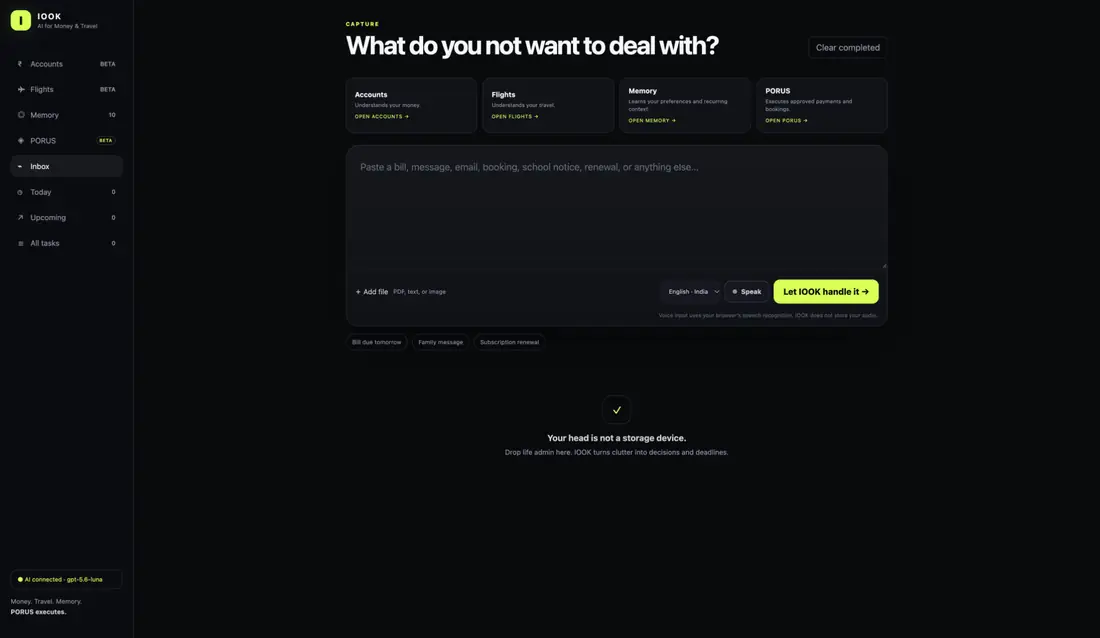
What happens after you submit something?
IOOK sends the content to its interpretation layer. The system attempts to extract concrete actions, dates, times, categories, tags, people, places, and useful details. You review what it understood before saving the results.
“The electricity bill is ₹4,380 and is due Friday. Remind me Thursday evening.”
“I have a meeting with the supplier after lunch Tuesday, then call the accountant.”
“This subscription renews on the 18th for ₹1,499.”
A message can contain more than one action. IOOK is intended to split multi-step language into separate tasks instead of collapsing the whole message into one vague reminder.
Chapter 04 · Input methods
Type it, paste it, upload it, or speak it.
Text
Type naturally. You do not need a special command format. Dates such as “Friday,” “tomorrow,” “20 November 2026,” or “Tuesday at 6 PM” can be interpreted using the current local date supplied by your browser.
Files
The Inbox accepts common files such as PDFs, text files, CSV files, and images. Accounts also has a dedicated financial-document upload path. File content may be sent through the IOOK server and the configured AI connection for analysis.
Voice
Press Speak, talk normally, and press Stop speaking when finished. The current beta uses browser speech recognition. The language selector can be changed between supported options such as English (India), Hindi (India), and English (US).
Voice privacy: the current UI states that IOOK does not store the audio recording. Speech recognition behavior can still depend on the browser/platform providing the recognition service.
Chapter 05 · Tasks
Today, Upcoming, and All tasks.
Once actions are saved, IOOK organizes them into task views. Today shows items due today. Upcoming shows future-dated items. All tasks is the complete task inventory.
Send revised quotation
Business · Supplier · Tomorrow 4:00 PM
Pay broadband bill
Bills · Due Friday
Restaurant reservation
Personal · Saturday
Tags and categories
Tasks can carry broad categories such as Business, Finance, Travel, Family, Bills, Shopping, Subscription, Personal, Home, or Appointment, plus more specific tags. You can search across task titles, details, people, places, categories, and tags.
Completing vs deleting
A completed task can remain useful as history, especially because Memory profiles can use completed items to explain previous context. Deleting an item removes it from the browser’s task store, so use deletion more carefully than completion.
Chapter 06 · Accounts
Give IOOK financial information and ask questions about it.
Accounts is IOOK’s financial-administration workspace. It is intended to understand money records rather than merely storing unstructured notes. You can paste transactions or upload statements, bills, invoices, receipts, and other financial documents.
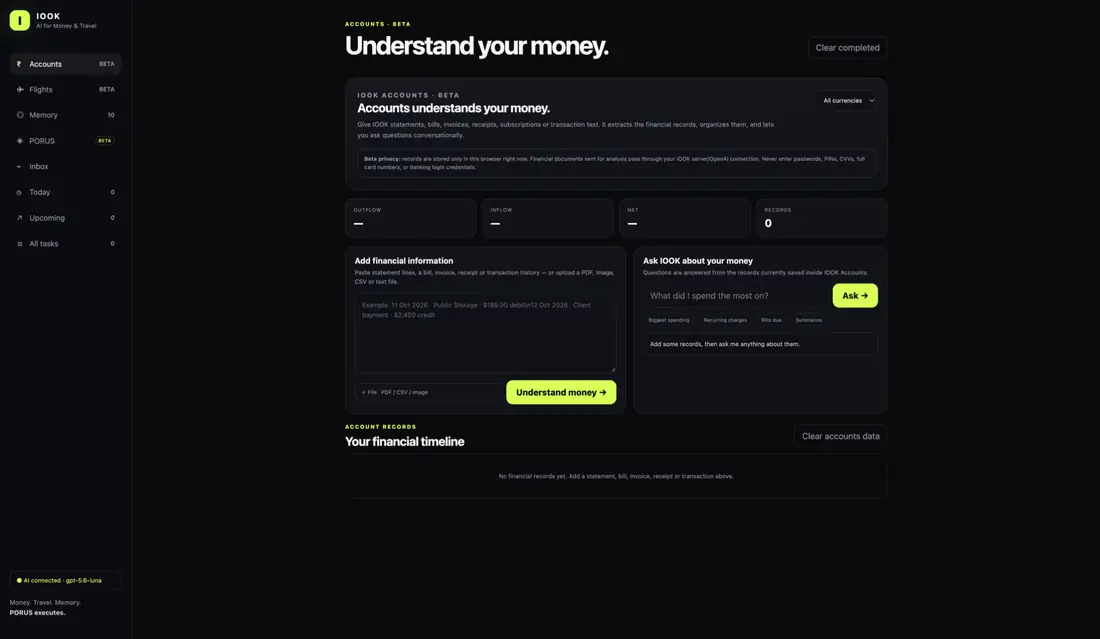
What IOOK extracts
Depending on the source, IOOK can attempt to identify descriptions, dates, amounts, currencies, inflow/outflow direction, categories, document type, due dates, and payment status. The top summary shows totals such as Outflow, Inflow, Net, and Records.
Questions you can ask
“What did I spend the most on this month?”
“Which recurring charges can you see?”
“Show me every payment above ₹10,000.”
“Which bills still look unpaid?”
“Compare inflow and outflow.”
Account currency filter
Account records keep their own native currencies. If the records include multiple currencies, the Accounts filter lets you focus on one currency without rewriting the underlying data.
Current beta storage: financial records are stored in the browser. They are not yet a cloud-synced financial ledger. Clearing browser storage can remove them.
Chapter 07 · Connected banking
What the Setu Account Aggregator section is for.
The connected-banking area is designed around India’s consent-based Account Aggregator model. The intended experience is: the user starts a consent request, the regulated AA/banking flow handles authentication, the user approves the requested data access, and IOOK can then fetch only the financial information covered by that consent.
- Open Accounts.
- Enter the mobile number associated with the supported financial account.
- Press Connect bank.
- Complete the external consent/authentication flow.
- Return to IOOK and use Check consent.
- When approved, the beta can create a data session and attempt to fetch the approved information.
Important production limitation: the Setu AA connection is a sandbox/development integration today. A real production FIU arrangement requires the appropriate regulated/partner structure. Do not interpret “Setu Sandbox Ready” as permission to access real customer bank data in production.
What IOOK should never ask you for
IOOK should not ask you to type your internet-banking password, UPI PIN, card CVV, or bank OTP into the IOOK interface. Those credentials belong inside the regulated bank/payment authentication flow.
Chapter 08 · Currency
Auto-detection, symbols, and manual override.
The currency control lives directly below the IOOK logo. Auto first checks the browser
timezone because that is often a better indicator of the user’s current region than the browser UI language.
For example, Asia/Kolkata maps to ₹ INR.
Users can override Auto and choose INR, USD, EUR, GBP, JPY, SGD, CAD, AUD, CNY, or CHF. The preference is saved in that browser.
Flights and converted prices
Duffel may return the airline fare in a different currency. IOOK can display an approximate converted amount for convenience while retaining the original airline amount and currency underneath. PORUS must use the original offer data rather than silently changing the airline charge.
Displayed to an INR user
Approximate conversion
Original airline fare
Preserved for execution
Chapter 09 · Flights
Search conversationally, refine naturally.
Flights is a dedicated travel conversation, separate from the general Inbox. The current integration can use Duffel inventory when the Duffel API token is configured. Test mode is for integration testing; it should not be treated as guaranteed real-world fare accuracy.
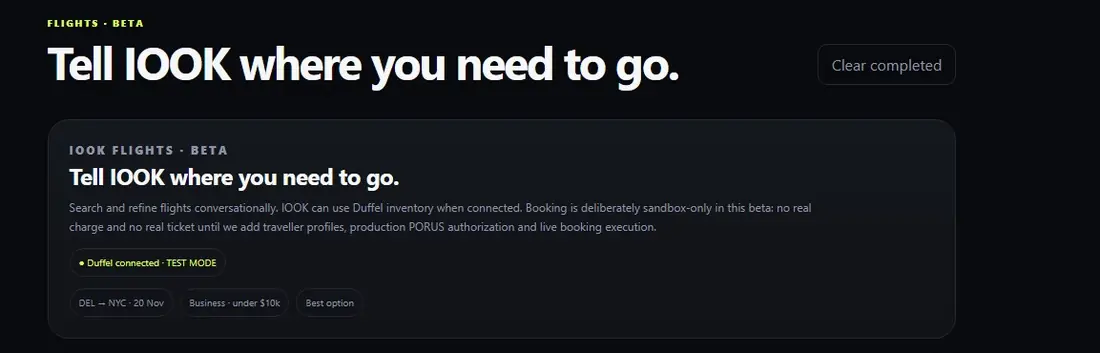
Start with route + date
“Book me a flight from New Delhi to New York on 20 November 2026.”
After the route and date are understood, you can continue with a short follow-up instead of repeating everything.
“Business class, under ₹8 lakh, maximum one stop.”
“Show me the best option.”
Airports, cities, and countries
Duffel ultimately needs airport/city identifiers. IOOK accepts common 3-letter IATA codes such as
DEL, JFK, LHR, PEK, or PVG. If somebody
says only a country such as “China,” IOOK should ask for a specific city or airport rather than pretending
the country name is an airport code.
User: “ATL to China on 10 November.”
IOOK: “Which city or airport in China?”
User: “PEK.”
IOOK: “Which city or airport in China?”
User: “PEK.”
Selecting a result
Flight cards can show airline, route, cabin, stops, duration, segments, and fare. Choosing a flight moves the request toward the PORUS confirmation boundary.
Can IOOK issue a real ticket today?
No. The current beta deliberately stops before real-money ticket issuance. Traveller profiles, fare revalidation, explicit PORUS approval, provider-profile linking and gated Duffel TEST orders are now implemented. Live provider activation, customer-money execution and real ticket issuance remain intentionally locked before public production use.
Chapter 10 · Memory
People, places, context, tasks, and history.
Memory turns repeated context into something you can inspect. IOOK can remember explicitly mentioned entities such as people, companies, doctors, clinics, vendors, manufacturers, clients, employees, and places. The current beta does not try to infer private relationships or hidden personal facts from a name alone.
Jordan
Person · mentioned 12 times · 3 open tasks
New York
Place · recurring travel context
What happens when you click a memory?
A Memory profile can show the entity’s mention count, related open tasks, completed/history items, and an AI-generated “Before you talk” brief. The brief is supposed to summarize the actual task/history information IOOK has, not invent motives, relationships, deadlines, or facts.
“Before you talk to Jordan: you have three open items — revised quotation, shipment timing, and warehouse confirmation. The pricing review is already completed.”
Why Memory matters
The long-term purpose of Memory is not simply to collect names. It is to make IOOK context-aware enough that you do not have to reconstruct the history of a person, project, place, or recurring situation every time.
Chapter 11 · PORUS
The permissioned action layer.
PORUS stands for Personal Orchestrator for Reliable and Uncomplicated Services. Its job is to execute approved actions for IOOK. That distinction matters: understanding a request is not the same as being allowed to spend money or make a booking.
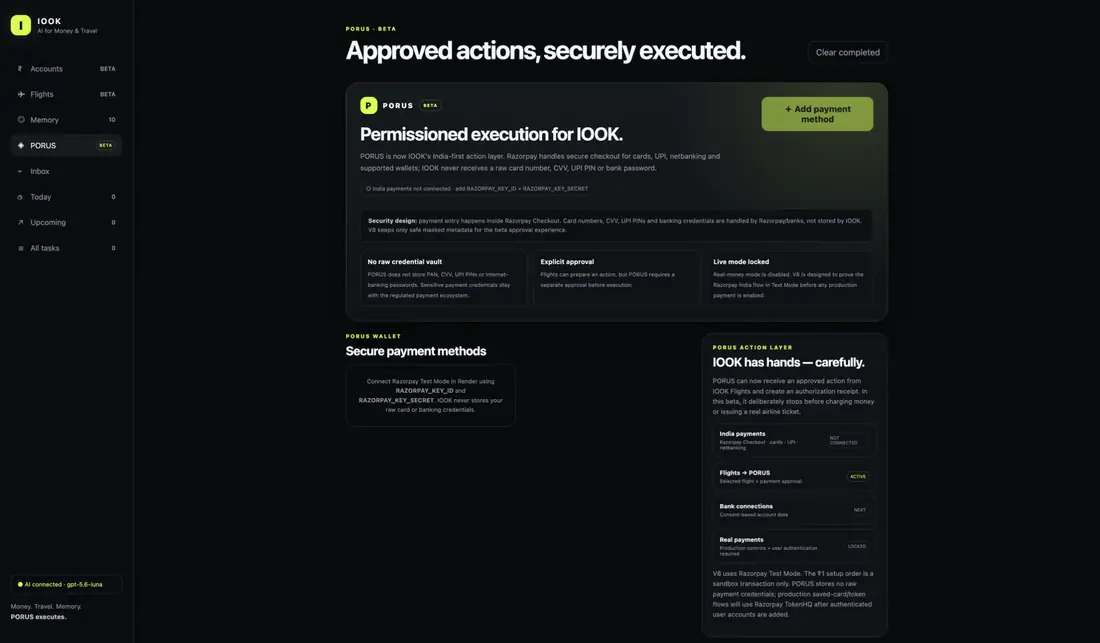
Adding a payment method
In the current India-first beta, PORUS opens a Razorpay-hosted checkout/test flow. Sensitive payment entry is intended to occur in the provider’s secure interface rather than through an IOOK card-number form.
What IOOK should retain
IOOK should retain only safe references or metadata needed to identify a payment method, such as network, provider token/reference, or masked last digits. It should not persist raw PAN, CVV, UPI PIN, or online-banking passwords.
Explicit approval
A flight may be prepared by IOOK, but PORUS is supposed to ask for a separate authorization before execution. Even when payment credentials are tokenized, the bank/payment network may still require OTP, 3-D Secure, UPI authorization, or another form of customer authentication.
Real payments today
Real-money execution remains locked in the beta. Razorpay Test Mode can validate integration behavior without moving real money. Authenticated IOOK accounts, provider-profile linking, spending controls, step-up confirmation and execution receipts are now implemented. Live payment enablement still requires production-provider activation, compliance review and a controlled public rollout.
Chapter 12 · Security & privacy
The security model IOOK is aiming for.
Security is not a single switch. IOOK separates different classes of data and tries to keep the most dangerous credentials outside the IOOK application wherever possible.
Payment credentials
Card entry, CVV, UPI PIN, and payment authentication should live inside the payment-provider/bank flow, not inside IOOK.
Bank credentials
Internet-banking passwords, PINs, and OTPs should never be collected as normal IOOK fields.
API secrets
OpenAI, Duffel, Razorpay, and Setu secrets belong in server environment variables, never in client JavaScript or public GitHub code.
Explicit execution
High-impact actions should cross a PORUS confirmation boundary rather than being triggered solely because the AI understood a sentence.
Never paste secrets into IOOK chat or public screenshots: API keys, full card numbers, CVVs, bank passwords, UPI PINs, OTPs, or private production credentials.
No product should claim to be “unhackable.” A stronger design principle is to minimize what sensitive data IOOK receives in the first place, separate customer data by user, encrypt sensitive information, restrict production access, keep audit logs, and use regulated providers for regulated operations.
Chapter 13 · Where your data lives today
Your private workspace now follows your IOOK account.
| Data | Current beta location | Important consequence |
|---|---|---|
| Tasks | Dedicated Supabase rows | Private per-user rows protected by Row Level Security and available across signed-in devices. |
| Memory | Dedicated Supabase Memory + mention rows | Entities, mention history, and task associations are private per-user records protected by Row Level Security. |
| Accounts records | Private Supabase cloud state | Cross-device private storage today; normalized financial tables come in V11.2C. |
| Display currency | Dedicated Supabase settings row | Your preference follows your signed-in IOOK account. |
| API secrets | Render/server environment | They should never be exposed to browser JavaScript. |
| Payment entry | Razorpay-hosted flow | Raw credentials should remain outside IOOK. |
What needs to happen before production-scale use?
IOOK now has authenticated users, Row Level Security, normalized Tasks, Settings, and Memory. Accounts, traveller data, flight history, and PORUS approval history are the next data domains to normalize. Payment tokenization, production banking partnerships, notifications, and mobile delivery remain later production layers.
Chapter 14 · Current status
What is working, what is sandbox, and what is planned.
| Feature | Status | Meaning |
|---|---|---|
| Inbox capture | BETA WORKING | Text/file/voice capture and AI interpretation are usable. |
| Task views | BETA WORKING | Today, Upcoming, All tasks, categories, tags, completion. |
| Memory profiles | DATABASE WORKING | Private relational entities, mention history, task associations, cross-device profiles, and grounded AI briefs. |
| Accounts document analysis | BETA WORKING | Paste/upload financial records and ask questions. |
| Setu bank connection | SANDBOX | Development flow only; production FIU/partner requirements remain. |
| Duffel flight search | TEST MODE | API integration works, but test inventory may not represent real-world fares. |
| PORUS / Razorpay | TEST MODE | Payment flow architecture can be tested without real money. |
| Real airline ticket issuance | LOCKED | Traveller profiles, production payment, fare recheck, and live order creation still required. |
| User login + private database | BETA WORKING | Supabase Auth, private sessions, RLS, cross-device Tasks/Settings/Memory. |
| Phone app + push notifications | PLANNED | Future direction; not part of the current web beta. |
Chapter 15 · Prompt cookbook
Examples that show how IOOK is meant to be used.
Inbox / life admin
“The internet bill is due tomorrow. Remind me tonight and add it under Bills.”
“Friday: accountant first, supplier meeting after that, dinner later.”
Accounts
“Summarize where my money went this month.”
“Which expenses look recurring?”
“How much total outflow is in INR?”
Flights
“Delhi to New York, 20 November 2026.”
“Business class, under ₹8 lakh, maximum one stop.”
“ATL to China on 10 November.” → IOOK should ask which city.
Memory
Open a person in Memory to see open tasks, history, and the “Before you talk” brief.
PORUS
After selecting a flight: “Use my preferred payment method.” PORUS should still require the appropriate approval/authentication boundary.
Chapter 16 · Troubleshooting
When something does not work.
“The website still looks like the old version.”
Check GitHub first: make sure you replaced app.py, not a similarly named file such as aap.py. Then in Render confirm the live deploy corresponds to the latest Git commit. Hard-refresh the browser afterward.
“AI connected” is missing.
Check the OpenAI environment variables in Render. API billing is separate from a ChatGPT subscription, so API credits/billing must also be active.
Flights returns a provider error.
Verify the Duffel token and Test Mode status. If the location is a country, give a city or IATA code. If Duffel itself rejects a test offer, try another route/date because sandbox inventory can be unusual.
PORUS says payment is not connected.
Verify RAZORPAY_KEY_ID and RAZORPAY_KEY_SECRET in Render. Test and live credentials must not be mixed.
Setu gives 403 / KYC errors.
The AA production path has regulatory onboarding requirements. A Setu sandbox credential does not by itself make IOOK a production FIU. Complete only legitimate onboarding steps; do not select a regulator licence the company does not have.
Currency default is wrong.
Use the currency selector under the IOOK logo. Auto uses browser timezone first, then locale. A manual selection overrides Auto for that browser.
My data disappeared.
Tasks, Settings, and Memory now live in the signed-in private Supabase database. Accounts and PORUS history still use the authenticated private cloud-state layer until their normalized migrations. If something appears missing, verify you are signed into the same IOOK account and that the database sync indicator is healthy.
Chapter 17 · FAQ
Questions new users are likely to ask.
Is IOOK a bank?
No. IOOK is an AI application. Bank data access and payment execution must go through the appropriate regulated providers/partners.
Does IOOK store my full card number?
The intended PORUS architecture is specifically designed not to store raw card PAN/CVV inside IOOK. Payment entry should occur in the provider-hosted secure flow.
Can PORUS book a real flight right now?
No. The current flow is a beta/sandbox flow. Real-money airline order creation is deliberately locked until the production security, identity, traveller-profile, payment, and live-booking pieces are finished.
Can IOOK read my bank balance automatically?
The product is being designed for consent-based connected banking, but the current Setu integration is sandbox/development. Production access requires the appropriate regulatory/partner arrangement.
Why does Memory exist if I already have tasks?
Tasks answer “what do I need to do?” Memory answers “what do I know about this person/place/context, and what history should I remember before I deal with it again?”
Can I change currency?
Yes. Use the Display currency control under the IOOK logo. Leave it on Auto or manually choose a supported currency.
Does IOOK work across my phone and laptop?
Yes for the authenticated private workspace. Tasks, Memory, Accounts records, PORUS history, and user settings sync to the signed-in account. Some transient sessions such as an in-progress flight conversation can still be device-local.
Will IOOK eventually have a phone app and notifications?
That is part of the product direction, but it is not live in this web beta today. A mobile app/push-notification system should come after secure user accounts and cloud data are in place.
IOOK MEMORY
People and places IOOK learns from your life.
IOOK remembers recurring doctors, clinics, employees, clients, vendors, manufacturers, companies and other useful entities that you explicitly mention. Memory now follows your signed-in IOOK account through private relational database rows and can link those entities to the tasks where they were mentioned.